


Skin Care Scanner: GlowUp
4.74.00 Reviews
App Specs
- Version
- 1.0.1
- Updated On
- License
- Free
- Downloads
- 10,000+
- Developer
- BroxApp Studio
- Categories
- Beauty
- Platform
- Android
Screenshots
 Analysis by AppCompare
I usually want a skincare app to help me make one useful decision, not leave me with a screen full of numbers and more products to buy. Skin Care Scanner: GlowUp is aimed at that practical starting point: it brings skin scanning, routine support, and skincare guidance together. For a first-time user, the best way to approach it is as a companion for noticing patterns and organizing habits, rather than as a substitute for a dermatologist or a promise of perfect skin.
Getting Started with GlowUp
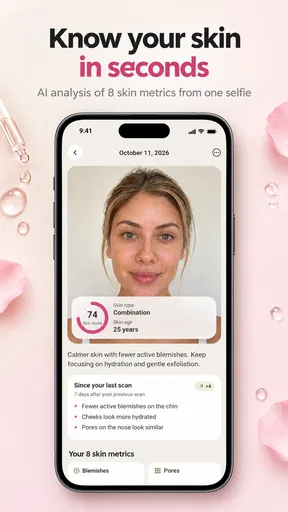
First off, setting up Skin Care Scanner: GlowUp is a breeze. The app welcomes you with a sleek, user-friendly interface that makes navigation a piece of cake. You start by snapping a selfie—no fancy camera skills needed. The app uses AI technology to analyze your skin's condition. It's like having a skincare expert in your pocket, minus the hefty price tag.
What to Expect from a Skin Scan
GlowUp is a beauty app from BroxApp Studio, and its central idea is to make a skin check part of a broader routine. Its scanner can be a useful prompt to pay attention to your complexion, but I would treat a scan as an estimate, not a diagnosis. Skin can look different from day to day because of lighting, makeup, sleep, weather, and many other factors. A result is most helpful when it encourages a thoughtful next step, rather than when it is taken as a definitive judgment about your skin.
That distinction matters if you are new to skincare. A scan may help you decide what you want to observe or discuss, but it cannot replace professional care for persistent irritation, painful symptoms, or a changing spot. I would also avoid changing several products at once because of one result. Keeping the rest of your routine steady makes it easier to tell whether a change is actually helping.
Features That Shine
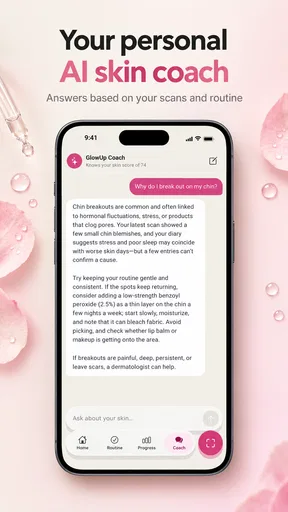
GlowUp offers a range of features designed to help you understand and improve your skin health. The skin analysis tool is at the heart of the app. It evaluates various aspects such as hydration, texture, and even signs of aging. Each analysis provides a detailed report, breaking down the areas that need attention. This personalized approach is fantastic for anyone serious about skincare.
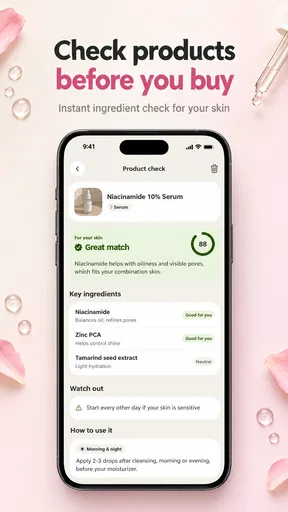
Another standout feature is the product recommendation system. Based on your skin analysis, the app suggests products tailored to your specific needs. It’s like having a personal shopping assistant who knows exactly what your skin craves. Plus, the recommendations come with user reviews and ratings, so you can make informed choices.
My practical advice is to use recommendations as a shortlist, not an instruction to buy. Check the ingredient list, consider whether the product suits your budget and existing routine, and introduce only one new item at a time. That gives you a clearer way to notice a reaction and avoids turning a simple scan into an unnecessary shopping trip. If your skin is sensitive, patch-testing a new product is a sensible precaution.
Worth Reading Before You Choose

Flipboard Shows What News Apps Must Do Beyond the Feed

Switching to Android Auto Means Rethinking Your Driving Routine

Google Calendar Makes a Crowded Week Easier to Manage

Ludo King Makes the Most of the Minutes Between Plans

Baby Panda World Brings Quick Play to Modern Phones, but Its Game Library Feels Busy

ESPN’s Live Game View Makes Following Close Games Easier
A First Useful Routine
For a first scan, choose a moment when you can repeat similar conditions later: a clean face, reasonably even light, and no filter or heavy makeup. This is not about getting a flawless photo; it is about making comparisons less misleading. If a result gives you something to work on, write down what you plan to change before adjusting your routine. That small step can prevent an impulsive product switch from becoming difficult to evaluate.
A realistic use case is checking in on a Sunday evening before the week begins. You can take a scan, note what your skin has been feeling like, and decide to keep your routine unchanged or make one modest adjustment. If you later compare another check-in, the notes give the image context. Without them, a difference in lighting or a temporary blemish can look like a meaningful trend when it may not be.
Keeping Track of Your Skin Journey
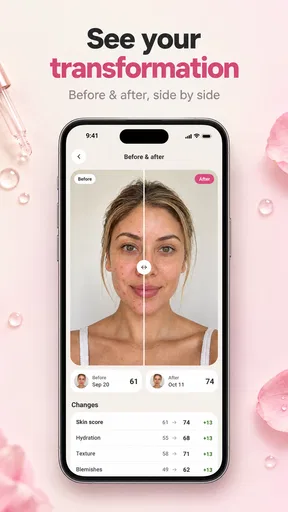
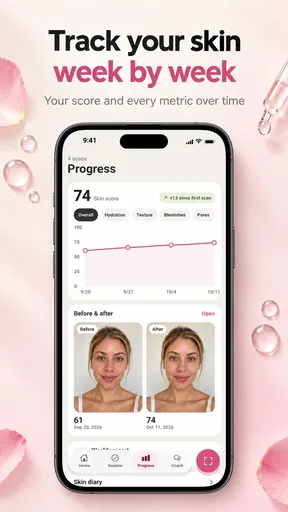
One of my favorite features is the progress tracker. It allows you to document changes over time, so you can see exactly how your skin is improving. You can add notes, upload photos, and even compare snapshots side by side. This feature is super helpful for spotting trends and adjusting your routine accordingly.
The app also includes a skincare diary where you can log your daily routine, including products used and any skin reactions. This diary acts as an invaluable resource, especially if you're trying to identify what works and what doesn’t.
The diary is especially useful when your memory is unreliable. If your skin becomes irritated, a brief note about what you used and when can be more informative than trying to reconstruct your routine days later. Keep entries simple: product changes, noticeable reactions, and relevant routine details are enough to make a record useful. You do not need to document every small fluctuation for the tracker to earn its place.
Making Sense of the Advice
One common point of confusion with any scanner is the difference between a visual observation and a medical conclusion. GlowUp can help you organize what you notice, but I would not use it to diagnose a condition or decide that a concerning change is harmless. When something is persistent, painful, or worrying, getting advice from a qualified professional is the better choice.
Another question is whether the app is worthwhile if you already have a routine. I think it can be, if your main challenge is consistency or remembering what you have tried. If you already keep reliable notes and are happy with your routine, the tracker may add less value. Likewise, someone looking for a clinician-led treatment plan may be better served by professional care than by a consumer beauty app.
Community Vibes
GlowUp also has a vibrant community aspect. You can join forums, participate in discussions, and connect with other skincare enthusiasts. It’s a great place to swap tips, share experiences, and even get advice from skin experts. The community is welcoming and supportive, making the app feel like more than just a tool—it's a community.
Community discussion can be encouraging, but personal experiences are not automatically good advice for someone else. People have different skin, routines, and tolerances, so I would treat a tip from another user as an idea to evaluate rather than a rule to follow. That caution is particularly important when a suggestion involves strong products or replacing professional guidance.
Who Will Get the Most from It?
If you're someone who loves data and tracking progress, GlowUp is a dream come true. The detailed reports and progress tracker provide a wealth of information that can help you make informed decisions about your skincare routine. Plus, the personalized product recommendations take the guesswork out of shopping for skincare products.
For those who enjoy being part of a community, the app offers a robust platform to connect with like-minded individuals. This social aspect makes the app more engaging and interactive.
I see the strongest fit for beginners who want a gentle structure for learning their habits, and for people who tend to forget which products they used before a reaction appeared. It may also suit someone who enjoys checking in periodically but does not want to maintain a separate spreadsheet or paper diary. On the other hand, if you prefer minimal phone use, dislike taking face photos, or want medical certainty from an analysis, this is not the right tool for that job.
Compared with the usual alternatives, GlowUp sits between a basic notes app and a product-search app. Notes give you flexibility but require you to build your own system; shopping apps focus more on browsing and buying. GlowUp’s appeal is the combination of scanning, tracking, and recommendations in one place. The trade-off is that a dedicated clinician or a carefully maintained personal log can be a better fit when your priority is diagnosis or precise control over what you record.
Cost, Compatibility, and Staying in Control
The app is free to download, with in-app purchases listed from $4.99 to $29.99 per item. I would explore the free experience before paying for anything, then decide whether a paid item solves a real need for you. That is a better approach than assuming every recommendation or upgrade is necessary. It is rated for Everyone, has a 4.7 average from 244 ratings, and has passed 10K+ installs. Those figures can offer a little context, but they do not tell you whether its approach will suit your skin or habits.
The current version is 1.0.1, it was released on August 3, 2025, and it requires Android 7.0 or later. Those details are worth checking against your device before downloading. If you are using an older phone, confirming compatibility first can save time; if it runs the required system, the more important question is whether you will actually use the scan and diary consistently.
Final Thoughts
So, is the Skin Care Scanner: GlowUp worth downloading? In my opinion, absolutely. It offers a comprehensive approach to skincare, combining cutting-edge technology with a personal touch. Whether you're a skincare newbie or a seasoned pro, this app has something to offer. It’s user-friendly, informative, and genuinely fun to use.
If you're ready to take your skincare routine to the next level, give GlowUp a try. You might just find that it becomes an essential part of your daily routine. Plus, with the convenience of having everything you need in one app, maintaining healthy, glowing skin has never been easier.
My recommendation is to start small: take one scan under repeatable conditions, make a short diary note, and use the result to guide observation rather than a dramatic routine overhaul. If that simple loop helps you stay consistent, the app has a clear purpose. If you find yourself worrying over every score or buying products you do not need, step back and use a simpler routine or seek advice suited to your concern. Used with that balance, GlowUp is a approachable way to make skincare feel more organized without treating an app’s assessment as the final word.
Pros
- Accurate skin analysis with AI technology.
- User-friendly interface makes navigation easy.
- Offers personalized skincare routines.
- Daily reminders to keep up with skincare.
- Vast database of skincare products.
Cons
- Limited features in the free version.
- Requires a stable internet connection.
- Occasional app crashes reported.
- Some features need in-app purchases.
- Limited language support and translations.
FAQs for Skin Care Scanner: GlowUp
What is Skin Care Scanner: GlowUp and how does it work?
Skin Care Scanner: GlowUp is an innovative app designed to analyze your skin's condition using advanced AI technology. By uploading a selfie, the app assesses various skin aspects, such as texture, hydration, and blemishes, providing personalized skincare tips and product recommendations. It aims to help users improve their skincare routine effectively.
Is my personal data safe with Skin Care Scanner: GlowUp?
Yes, your personal data is a top priority for Skin Care Scanner: GlowUp. The app uses secure servers and encryption to protect your photos and information. User data is stored in compliance with privacy regulations, ensuring that your details remain confidential and are not shared with third parties without consent.
Can Skin Care Scanner: GlowUp recommend products suitable for my skin type?
Absolutely! Skin Care Scanner: GlowUp provides personalized product recommendations based on your skin analysis. It considers factors like skin type, problem areas, and sensitivity to suggest products that are most likely to benefit your skin. This tailored approach helps users find the most effective skincare solutions.
Is Skin Care Scanner: GlowUp suitable for all skin types and ages?
Yes, Skin Care Scanner: GlowUp is designed to accommodate all skin types and ages. The app's AI technology adjusts its analysis and recommendations based on the unique characteristics of each user's skin, making it versatile and beneficial for a diverse range of users seeking personalized skincare advice.
Do I need to pay to use all features of Skin Care Scanner: GlowUp?
Skin Care Scanner: GlowUp offers a free version with basic features for skin analysis and recommendations. However, to access premium features such as detailed reports, advanced tracking, and exclusive product suggestions, a subscription may be required. Check the app store for the latest pricing details.


